Installation
Installation differs by coding agent. Install Better Harness separately for each host, except that Qoder CLI can use the version bundled with Qoder Desktop. After installing or updating a plugin, start a new session or task so the host reloads its plugin inventory.
Prerequisites
To use Better Harness from a host, install one of the supported coding agents below and make sure it can open the repository you want to analyze. The host's own system requirements and runtime still apply; follow its tab without running the repository's development setup unless the tab explicitly uses a source checkout.
Node.js and npm are required only when you use the standalone CLI, run Better Harness from a source checkout, or contribute to this repository. Those paths support Windows, macOS, and Linux and require:
- Node.js
>=22.20.0 <25.0.0 - npm
>=10.9.3 <12.0.0
Check the active runtime before using the standalone or source CLI:
node --version
npm --version
Inspect and plan lifecycle changes
The standalone CLI exposes a read-only view of Better Harness installation evidence. It does not contact a registry, modify host configuration, or execute the steps in a lifecycle plan:
better-harness plugin status --host all
better-harness doctor --platform all
better-harness plugin plan install --host qwen --surface cli --scope user
better-harness plugin verify --host qwen --surface cli
Plans preserve host differences instead of inventing a common mutation path.
Qoder Desktop is bundled, Codex Desktop returns manual UI steps, Cursor remains
session-only while its native command contract is reconciled, Pi operations
without current native evidence are manual or unavailable, and WorkBuddy has no
managed plugin lifecycle surface. There is no plugin apply command.
Git can clone the Cursor manifest for inspection, but manifest presence alone does not establish a supported installation route.
DeepSeek Harness verified discovery (not Quickstart)
DeepSeek Harness (DSH) has a bounded Verified install/discovery route for
the qualified DSH 0.1.1-rc.2 contract. This is not a public Quickstart or a
complete report loop.
Start from a complete Better Harness source checkout or npm package directory.
Call its absolute directory <BETTER_HARNESS_ROOT> below. It must contain
skills/better-harness/SKILL.md, scripts/better-harness.mjs, references/,
models/, and templates/.
Install with the host shell
One DSH command installs the published package as a profile bundle layer:
dsh plugin --profile <name> add @qoder-ai/better-harness
# and, to undo it completely:
dsh plugin --profile <name> remove @qoder-ai/better-harness
DSH reconciles the dsh.bundle.patch declaration in the package's
package.json into dsh.profile.bundles, and the single row in
.dsh-plugin/cordis.patch.yml registers the canonical Skill in the global
skills layer and attaches the explicit-only policy.
Verify the boundary
Enter the gesture directly as the user:
/better-harness
DSH must inject the canonical Skill before model request derivation. The local
policy checks DSH's winning source, path, directory resource base, complete-root
invariant, and required root resources. It rejects a higher-precedence
project-local same-name Skill and rejects model-facing
skill({ name: "better-harness" }) calls.
Do not install a standalone Skill copy or use a symlink/junction as the canonical
route. Repository contributors can repeat the pinned, credential-free native
proof with npm run test:dsh-native, and the offline shell chain (declaration,
patch row, entry, provider, canonical verification) with npm run test:dsh-bundle.
Fallback: manual configuration
If the host shell is unavailable, point the active
skill-filesystem.customSkillDirs at the absolute
<BETTER_HARNESS_ROOT>/skills directory and load the Better Harness DSH policy
from the same complete root. Use an absolute path on macOS, Linux, and Windows,
including when it contains spaces or Unicode. DSH resolves relative
customSkillDirs from its process working directory and does not expand a
literal ~. If the complete Better Harness root moves, update both the
customSkillDirs value and policy plugin path/configuration.
Inventory configured assets
The independent developer-preview configured-assets provider reports native filesystem Skill winners and cwd-sensitive Instruction sources as configured-not-observed evidence:
better-harness agent-customize inventory --provider dsh --workspace <path> [--cwd <path>] [--dsh-home <path>] [--include-user-home[=true]]
The default excludes user-home DSH and Agents roots. Add
--include-user-home only when those sources are intentionally in scope.
Runtime/in-process Skills and active Cordis, Profile, and Preset composition
remain unresolved, so the inventory does not prove that any asset was used.
Repository contributors can repeat the pinned, credential-free native
comparison with npm run test:dsh-configured-assets-native. The complete
configured-assets boundary is documented in the
adapter matrix.
Shared read-only analysis is available through harness evidence-bundle and
harness analyze; pass --workspace <path> --cwd <effective-cwd> --platform dsh.
The configured cwd must resolve inside the workspace. DSH still does not provide
complete runtime configured-asset resolution, output routing, rendering,
Checkup, lifecycle management, MCP/profile product support, Web minimal, a
public Quickstart, or a full durable report workflow. The
adapter matrix tracks the exact
boundary.
The six tabs below are the verified Quickstart paths, while the project tracks ten fuller host adapters plus bounded DSH capabilities. Compare all adapter support boundaries, then follow the new-host contribution workflow and worked pull requests if you want to add or complete an integration. You can also browse current repository pull requests before starting overlapping work.
- Claude Code
- Codex
- Qoder
- Cursor
- Qwen Code
- GitHub Copilot
Claude Code
Register this repository as a Claude Code marketplace:
/plugin marketplace add QoderAI/better-harness
Then install Better Harness:
/plugin install better-harness@better-harness
Verify installation
Verify discovery from the shell:
claude plugin details better-harness@better-harness
The details should include Skills (1) better-harness. Then start a new
Claude session in the repository you want to analyze and run the report prompt:
/better-harness analyze this project's AI coding workflow and generate an evidence-backed report
Claude Code defaults to a self-contained report.html with paired report.md
and findings.json under the repository's .claude/better-harness report
root. Ask for inline or no-files output to keep the result in chat only.
Workspace-matching local Claude sessions are included when available; missing
evidence stays explicit rather than being inferred.
Codex
Codex Desktop
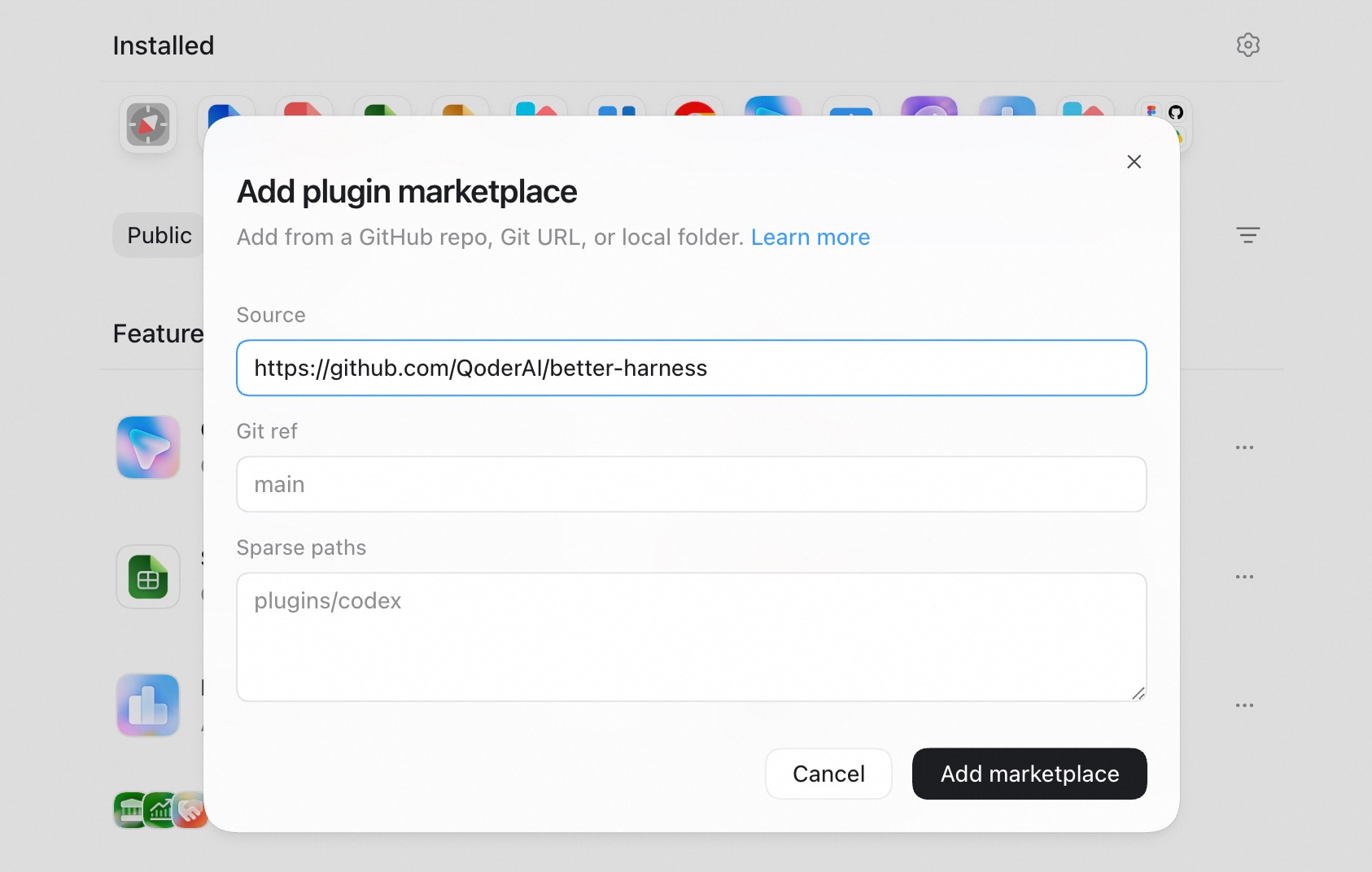
- Open Settings > Plugins.
- Select + Add > From Marketplace.
- Enter the Git repository URL, set its Git ref, and leave Sparse paths empty for this single-plugin repository.
- Select Add marketplace, then install Better Harness from the new marketplace.
Use https://github.com/QoderAI/better-harness.git with Git ref main.
Codex CLI
Add the repository source:
codex plugin marketplace add "https://github.com/QoderAI/better-harness.git" --ref main
Then inspect and install Better Harness:
codex plugin list --marketplace better-harness
codex plugin add better-harness@better-harness
Verify installation
For Codex Desktop, confirm that Better Harness appears installed under Settings > Plugins. Then start a new task in the repository you want to analyze and run:
@better-harness analyze this project's AI coding workflow and generate an evidence-backed report
For Codex CLI, confirm that the configured marketplace exposes the plugin:
codex plugin list --marketplace better-harness
Then start a new Codex task in the repository you want to analyze and run:
$better-harness:better-harness analyze this project's AI coding workflow and generate an evidence-backed report
Use the repository URL with marketplace add, not a raw marketplace.json
URL. Current Codex builds use plugin add and --marketplace; examples that
use plugin install or --source target a different CLI contract.
Qoder
Better Harness is built into the Qoder desktop app, so no Marketplace or local plugin installation is required there. Choose either entry point:
-
From a session: Open the repository you want to analyze, start a new session, and run the report prompt:
/better-harness analyze this project's AI coding workflow and generate an evidence-backed report -
From Quest (Qoder 1.18.0+): Open Quest, then select Better Harness (Beta) from the left sidebar.
Qoder CLI
If Qoder Desktop is installed, Better Harness is already available in Qoder CLI. No marketplace or plugin installation is required.
Only when using Qoder CLI without Qoder Desktop, inspect the current manual installation disposition before following Qoder's native marketplace flow:
better-harness plugin plan install --host qoder --surface cli --scope user
The planner does not emit the older install syntax because the current native help and this repository's historical documentation disagree.
Verify installation
For Qoder Desktop, start a new session and run the report prompt shown above. On Qoder 1.18.0 or newer, seeing Better Harness (Beta) in the Quest sidebar also confirms the built-in entry point is available.
For a manual Qoder CLI installation, verify discovery with:
qodercli plugin list
better-harness plugin verify --host qoder --surface cli
Then start a new Qoder CLI session before using /better-harness.
Cursor
The Cursor plugin is not published to the marketplace. The repository carries
the source-local manifest, but the current local Cursor help does not verify the
historical --plugin-dir contract. Better Harness therefore reports the
installation plan as unavailable instead of emitting that command:
git clone https://github.com/QoderAI/better-harness.git
better-harness plugin plan install --host cursor --surface agent --scope session
Verify installation
Do not claim that a Cursor Agent session loaded Better Harness while the native installation contract remains unavailable. Inspect the bounded local evidence:
better-harness plugin verify --host cursor --surface agent
Only if a future or independently verified native route loads the plugin, keep that same Cursor Agent session open and run:
/better-harness analyze this project's AI coding workflow and generate an evidence-backed report
The verification result remains partial when runtime activation cannot be observed.
Cursor session evidence is supported through workspace-matched transcripts, metadata, and audit logs. Partial or unavailable coverage remains explicit.
Qwen Code
Install Better Harness as a Qwen Code extension:
qwen extensions install QoderAI/better-harness
Verify installation
Run qwen extensions list and confirm that it includes Better Harness. Then
start a new Qwen Code session in the repository you want to analyze and run the
report prompt:
/better-harness analyze this project's AI coding workflow and generate an evidence-backed report
Qwen Code produces a self-contained report.html with paired report.md and
findings.json. Session evidence coverage depends on Qwen Code's available
transcript paths; missing or partial evidence remains explicit.
GitHub Copilot
Register this repository as a Copilot plugin marketplace, then install Better Harness:
copilot plugin marketplace add QoderAI/better-harness
copilot plugin install better-harness@better-harness
Verify installation
Confirm that the plugin is installed and that its Skill is available:
copilot plugin list
copilot skill list
The output should include better-harness. Start a new Copilot CLI session so
it reloads the installed Skill. Prefer the marketplace path above because it
keeps discovery and updates tied to one registered source.
Copilot session evidence is supported through workspace-matched Copilot CLI
transcripts under ~/.copilot/session-state/. Copilot records no per-response
token usage, and VS Code Copilot Chat has no supported durable transcript; both
remain explicit evidence boundaries.
Next step
Generate your first report. If installation or discovery fails, use the bounded checks in Troubleshooting.